A pricing accuracy program your team can run weekly
Family Dollar's $63M settlement requires a pricing accuracy program. Here is one a pricing team can run weekly: one rule, five days, four numbers.
On 12 November 2026, the FTC and 17 states announced a $63 million settlement with Family Dollar. The allegation is simple. Shoppers paid more at the register than the price on the shelf, the tag or the ad. The proposed order, which still needs a judge's signature, does not stop at the money. It requires a pricing accuracy program that is independently assessed and certified every year.
That phrase will travel. Lawyers will ask for one. So will auditors and boards. And the people who will have to build it are not in legal. They are the pricing and category teams who decide prices and send them to stores. This article is a working version of a pricing accuracy program: one rule and a weekly routine you can start with a spreadsheet.
This is a practitioner's guide, not legal advice. Take the final read on any order or statute to your counsel.
What a pricing accuracy program has to do
Strip the order down and four verbs are left. The program must monitor prices, verify them, train people to spot discrepancies, and correct errors promptly, so the customer pays the advertised or displayed price. Reporting on the order adds the operating detail. Registers must not move to a higher price until that price is properly advertised. The lowest advertised price is honored. Inaccurate prices are corrected immediately.
Read that list as a pricing person and one thing stands out. Only part of it happens in the store. Whether the register runs ahead of the shelf is decided by when the price file is released, and that is our job. We made the C-level case for this in price accuracy is a governance problem, not a store problem. This piece is the how.
The bar is also known. US inspectors use the NIST price verification procedure, and a store passes at 98% accuracy or better. A program that cannot tell you your own score against that bar is not a program yet.
Rule one: the register never leads the shelf
Most overcharges are not wrong prices. They are right prices that arrived in the wrong order. The register changed on Monday. The tag changed on Wednesday. For two days every shopper who picked up that item was overcharged, and nobody decided that on purpose.
So the first rule of the program is about sequence, and it is different for each direction of change.
- Price increases: shelf first, register last. The new tag goes up, the store confirms it, and only then does the register price change. If the tag is late, the customer pays the old, lower price. You lose a little margin for a day. You do not overcharge anyone.
- Price decreases: register first, shelf after. The register drops, then the tag follows. If the tag is late, the customer sees the old, higher price and pays less at the till. Nobody complains about that.
- Promotion start: treat it as a decrease. The register is live when the doors open. Signs can go up the evening before, as long as the ad dates say when the price starts.
- Promotion end: treat it as an increase. Promo signs come down first. The register returns to the regular price only after the store confirms they are gone.
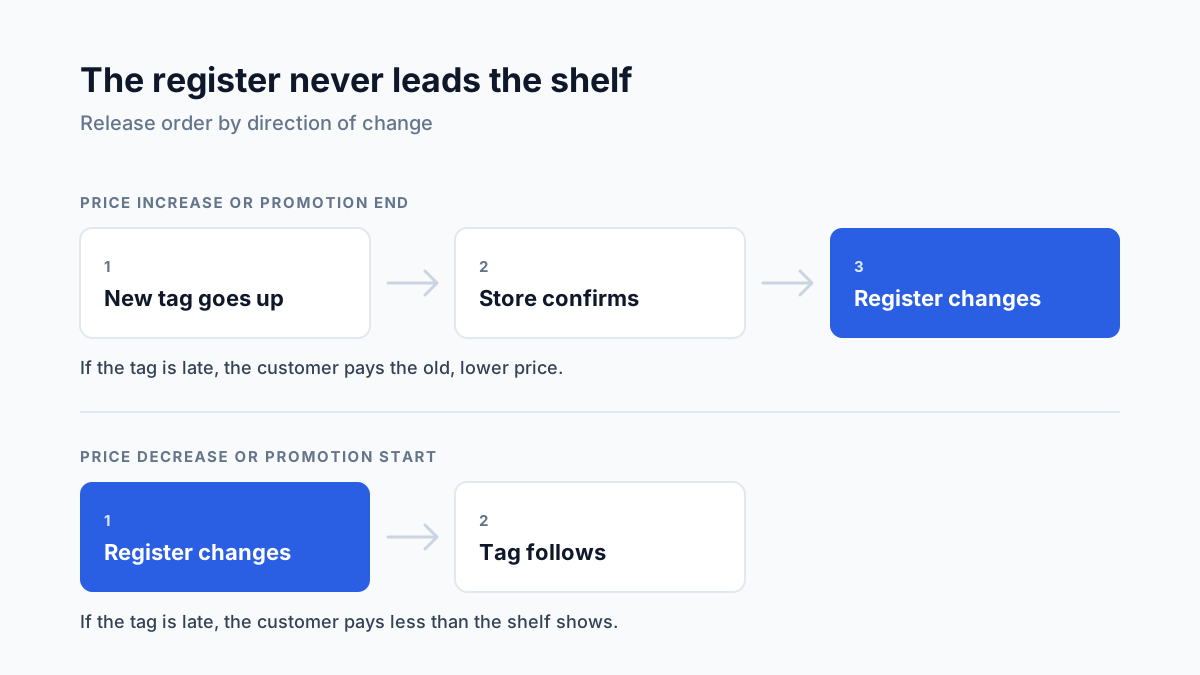
Every case follows one idea. When the copies of a price disagree, the disagreement must fall in the customer's favor. Build the release order so that a late tag costs you margin, never trust.
The cost of this rule is real and worth saying out loud. Increases land a day or two later than they could. For most retailers that delay is a rounding error next to one failed inspection. If your margins cannot carry a one-day delay on increases, the fix is a faster tag process, not a faster register.
The weekly routine
The rule only works if the week has a shape. Here is one that fits a retailer with weekly price changes and paper tags. With electronic shelf labels the gaps shrink, but the order of steps stays the same.
Monday: freeze the change file
Set a hard cutoff. Every price change approved before it goes into this week's file. Everything after waits for next week, unless a named person signs an exception. Then split the file in two: increases and promo ends in one list, decreases and promo starts in the other. They will be released differently.
Count the changes per store before you send anything. A store that can hang 400 tags in a shift should not receive 1,200. If the count is too high, the pricing team trims the file. The store should not be the one deciding which tags to skip.
Tuesday: send tags, release decreases
Stores get the tag batch with one effective date. Decreases and promo starts can go live in the register on schedule, because a late tag there does no harm. Increases and promo ends stay on hold.
Wednesday: confirm, then release increases
Each store confirms that the increase tags are up and the expired promo signs are down. A simple yes per store is enough to begin with. The register release for increases is gated on that confirmation. No confirmation, no increase in that store. This single gate is the closest thing to the order's requirement that registers do not move up before the price is advertised.
Thursday: verify a sample
Do not trust the confirmation alone. Check it. In a rotating set of stores, someone scans a sample of items and compares three copies of each price: the approved price, the register price and the shelf price. Where the item is in this week's ad or app, check that copy too.
A random sample is fair, but it is a slow way to find problems. Errors cluster where prices just moved. A workable starting mix for 100 items per store:
- 40 items whose price changed this week, increases first.
- 30 items at a promotion edge: started or ended in the last seven days.
- 20 top sellers and key value items, changed or not.
- 10 picked at random from the rest of the store.
Treat those shares as a starting point, not a standard. Keep the random part, though. It is the only part that tells you what an inspector, who does sample at random, would find.
Friday: fix, then log why
Every mismatch found on Thursday gets two actions. First the fix: correct the tag or the register within one working day, and until then the customer pays the lower price. Then the reason. A mismatch without a cause will come back next week. Six codes cover most of what you will find:
- Late tag. The tag was in the batch but went up after the effective date.
- Missed tag. The tag was never printed or never hung.
- Register not updated. The shelf is right and the register still holds the old price.
- Promo edge. A promotion ended in one copy and lived on in another.
- Ad or app mismatch. The flyer, website or coupon shows a price the register does not honor.
- Unknown writer. The register price matches nothing in the approved file. Someone, or some system, changed it outside the process.
The last code matters most. It means there is a way to change prices that your program does not see. Find it before you tune anything else.
After a month, sort the log by code. The top code tells you what to fix. If it is late tags, the batch is too big or the cutoff too late. If it is promo edges, your promotions need a written return price before they start. The store did not cause either of those.
Four numbers for the pricing accuracy program
A program that will be assessed needs numbers that hold still from week to week. Four are enough.
- Accuracy rate. Matching items divided by items checked, per store and in total. Report the random part of the sample separately, because that is the figure comparable with the 98% inspection bar.
- Overcharge share. Of the mismatches, how many went against the customer. With rule one in place this should fall toward zero. If it does not, the release gate is leaking.
- Time to fix. Hours from finding a mismatch to correcting it. Track the slowest fix as well as the average.
- Changes outside the window. Exceptions approved after the Monday cutoff, plus increases released without a store confirmation. This is the leading indicator. When it rises, next week's accuracy falls.
Put the four on one page and keep every week's page. A year of weekly pages, with the mismatch log behind them, is what an independent assessor will ask to see. It is also the fastest way to answer a store manager who says the price file is the problem. Sometimes it is, and the numbers will show it.
What this doesn't change
A routine does not hang tags. If a store has no hours for the Tuesday batch, the Wednesday confirmation will be late or, worse, untrue. Count tag changes as store labour when you plan the week, and treat a store that confirms everything instantly with some suspicion until Thursday's sample agrees.
Zero errors is not the target either. Tags fall off, customers move products, a register update fails overnight. The target is a known error rate above the inspection bar, mismatches that lean in the customer's favor, and fixes measured in hours.
And the routine does not replace legal review. Rules on price accuracy differ by state and by country. In the EU, a price reduction also has to show the lowest price of the last 30 days, so the history behind a tag must be right as well as the tag. What the routine gives your counsel is evidence, which is the part they cannot produce themselves.
Where Retailgrid fits
The routine above works with a spreadsheet and discipline. It gets easier when the first copy of the price is clean. In Retailgrid, proposed price changes go through an approval step. Each approval records who approved the price and when, and each recommendation comes with an explanation of why the price moved. Approved prices are published from one place, so the Monday file is an export, not a hunt through email.
That covers the approved copy and its trail. Retailgrid does not print tags, run your registers or scan your shelves. The gate on Wednesday and the sample on Thursday stay with your team and your stores. You can see the approval flow in the Retailgrid AI workspace, and the fields worth keeping for each change in the pricing audit trail: what to log for every price change.
Start with one store
You do not need a project to begin. Pick one store and one week. Split the change file by direction, hold the increases until the store confirms, and scan 100 items on Thursday. By Friday you will know your accuracy rate, your overcharge share and your most common cause. That is more than most retailers could tell an inspector today.
If you want to compare notes on your price change process, get in touch. We are happy to walk through it with you.
Founder and CEO of Retailgrid. 20 years in retail pricing, from Nielsen and IBM DemandTec to founding GoalProfit, a price optimization company he sold in 2023.