Retailgrid now speaks MCP: query your grids from any AI tool
Our MCP connector is in early access. Connect your pricing grids to Claude, ChatGPT or Codex and ask questions in plain language, with no CSV export.
Every pricing conversation I have with an analyst ends the same way. They export a CSV.
They already have the grid in front of them. Prices, costs, competitor positions, margin, price index, all live. Then they export it, drop the file into an AI assistant, and ask it to help them think. The export is a tax. The file is stale the moment it lands. It carries none of the permissions we built. And a living pricing workspace becomes a dead spreadsheet the instant it leaves the product.
Today we are starting the rollout of the Retailgrid MCP connector, in early access. It removes the export. You connect Retailgrid to Claude, ChatGPT or Codex, authorize once in your browser, and ask questions about your own grids in plain language. The answers come from your live data, scoped to exactly what your account is allowed to see.
The surface is small on purpose. It is also the most consequential thing we have shipped this year, and I want to explain why.
What the MCP connector does
Retailgrid now runs a public MCP server. MCP is the Model Context Protocol, the open standard AI assistants use to talk to outside systems. In practice it means any MCP-capable tool can discover what Retailgrid offers and call it directly, with no plugin to build on either side.
Version one exposes five read-only tools:
- List products and get a product, across your organization's catalog.
- List your grids and read a grid, selecting the columns you actually want.
- Check a job you own, to see whether an import or a run has finished.
That is the whole surface. It is deliberately boring, and the boring part is what makes it useful. Ask which SKUs in your Grocery grid sit below unit cost, and the assistant calls the grid reader, gets your actual rows back, and works from those. It is not recalling something general about retail pricing. It is reading your numbers.
Reads are bounded by design. Pages are capped. Long text fields are truncated and the truncation is reported rather than hidden. Decimal values come back as strings so no price gets mangled into a floating point approximation. Query budgets stop one careless question from becoming an expensive one. And results respect your permissions exactly the way the grid does: a colleague's grid returns not found, not a redacted preview.
Three questions to try first
The reference questions we qualified the connector against are deliberately ordinary. They are what an analyst asks on a Monday morning.
"Which products in my Grocery grid are priced below unit cost?" The assistant reads the grid, selects item ID, product name, price and unit cost, and filters. What comes back is a list you can act on, not an estimate. If the grid holds 12,000 rows, it pages through them.
"What is the margin spread across this category?" The same read, different arithmetic. The useful part is that the arithmetic happens on your rows, in front of you, where you can ask it to show its working and check it against the grid.
"Has the import I started this morning finished?" Trivial, and probably the one people will use most. Checking a job used to mean switching tabs and hunting for the run.
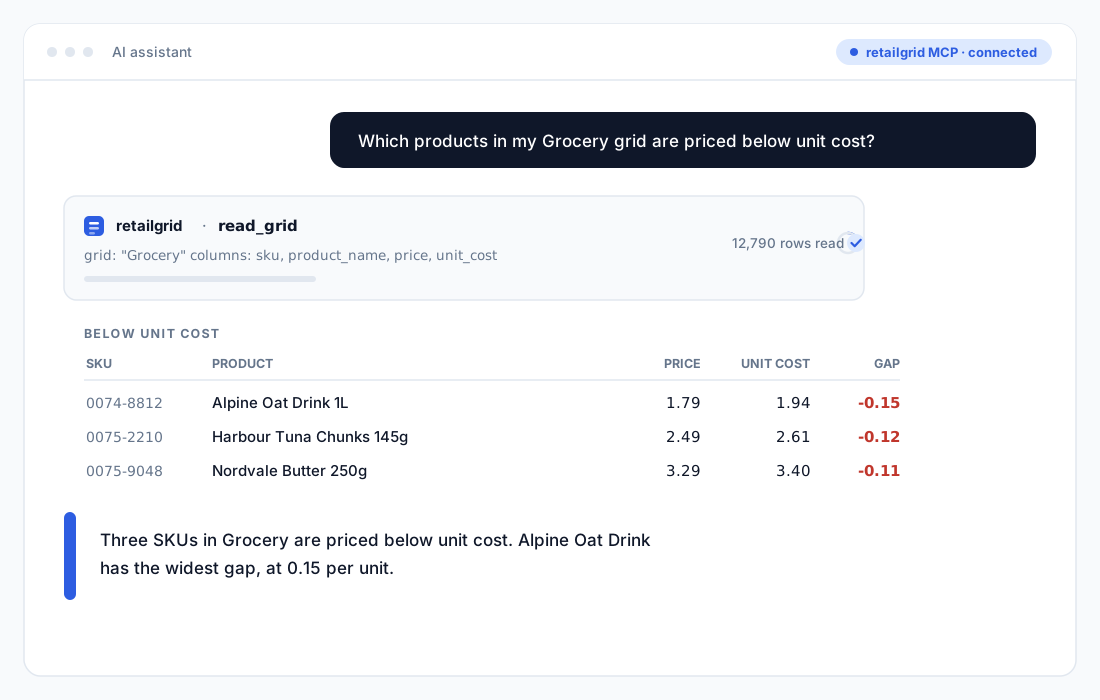
One thing worth being clear about. The assistant summarizes rows that we return. It has no model of your business sitting behind it. If it states a number, that number came from your data, or from arithmetic on your data. If you ask something the five tools cannot answer, the honest outcome is that it tells you so.
Why a protocol, and not just another API
We already have a public REST API. It is documented, it is stable, and integration teams use it every day. So why build something else?
Because an API serves the developer building a pipeline. MCP serves the category manager who has never written a line of code and never intends to. That person is already doing analysis inside an AI assistant. The only real question was whether they would do it on a stale export or on live data.
The second reason is that MCP stopped being one vendor's idea. Anthropic published it as an open standard in November 2024. OpenAI adopted it in March 2025, Google DeepMind followed in April, and in December 2025 the protocol was donated to the Agentic AI Foundation, a directed fund under the Linux Foundation co-founded by Anthropic, OpenAI and Block.
That matters commercially, not just technically. Building a bespoke integration per assistant is a treadmill nobody finishes. Speaking a protocol the major assistants have already agreed on means our customers choose their own tool, and we do not have to have an opinion about which one.
How authorization works, and why we dropped the API key plan
The original plan was the fast one: generate a key in settings, paste it into your client config, done. We changed it before shipping.
Pasted keys are long-lived. They get copied into config files and shared folders. They are hard to attribute to a person, and revoking one is an awkward conversation. For a connector that reads commercial pricing data, that was the wrong trade to make for a week of build time.
So the connector uses browser consent instead. You start the connection in your AI tool, your browser opens Retailgrid, you log in the way you already do, and you approve the connection. Three things follow.
- Grants are personal. The connection belongs to you, not to a shared secret sitting in a file.
- Grants are revocable. Disconnect in settings and the next call from that client fails immediately.
- Policy is rechecked on every call. Not once at connect time. Every call. If your organization's access changes, the connector changes with it.
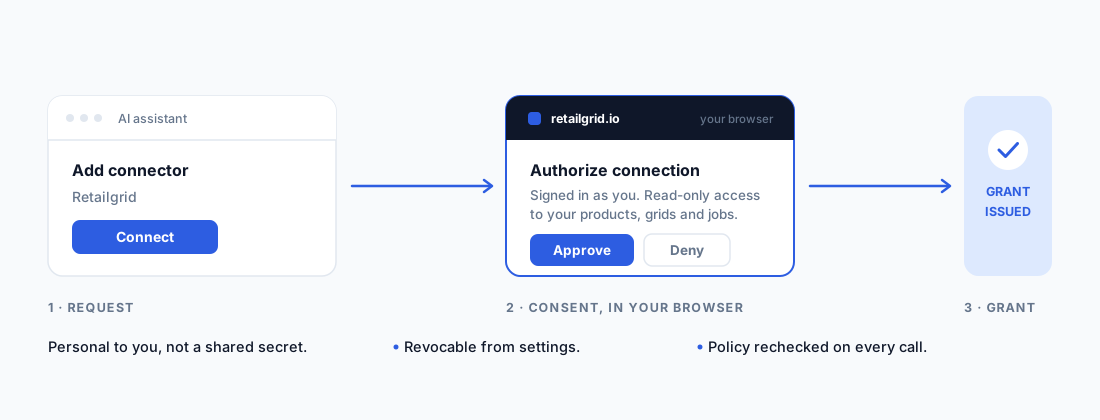
We qualified this against real clients rather than a test harness. Codex, ChatGPT and Claude each completed consent, discovered the five tools, called all five with bounded inputs, correctly failed on another account's grid, and lost access the moment the grant was revoked. Then regained it after fresh consent. That is the behaviour you want to watch before you point anything at your own pricing data.
What it deliberately cannot do
A release post that lists only capabilities is an advert, so here is the other half.
Version one cannot write. It cannot create, update or delete a single row. It cannot change a pricing rule, start an agent run, execute a scenario, or approve a price. It does not evaluate live formula columns. It gives an assistant no way to trigger anything at all.
That is not a scoping compromise we backed into. It is the order we chose.
An assistant that reads your pricing data and gets something wrong produces a bad answer, and you catch it. An assistant that changes your prices and gets something wrong produces a bad quarter. The difference is not in the model. It is in what the surrounding system permits, and in how much of the decision you can reconstruct afterwards.
Read-only first is how you learn what people actually ask, where the answers fall short, and which guardrails the write path will need before you build it. We would rather find that out now, on read traffic, than later on price changes.
Where this leads: Pricing Agent mode
This is the part I am genuinely excited about, so let me be precise about the claim rather than wave at it.
Retailgrid is built on a structured pricing process: product roles, rules, guardrails, optimization runs, and an approval step before any price reaches a shelf or a site. Those pieces already exist, and every one of them is explainable. What has been missing is a way for an agent to reach them from outside the product.
The connector is that door. Version one opens it for reading. The next steps are narrow, and in this order:
- Richer analytical reads. Price index bounds, KVI flags, price position buckets and category metrics, filtered the way the grid filters them.
- Proposals. An assistant drafts a price change set and hands it to the existing approval queue, where a person sees the reason, the rule behind it and the margin impact before anything moves.
- Runs. Triggering an optimization or a monitoring job, producing the same audit trail every other run already produces.
Notice what is not on that list. An agent that quietly changes prices. Every write path we add will land inside the approval workflow, not around it. If you cannot explain a price move in one sentence and point at the rule that produced it, the agent has not helped you. It has moved the accountability somewhere you cannot see.
That is what Pricing Agent mode means to us. Not a chat window bolted onto a pricing tool, but an agent working inside a rules-based, auditable process, leaving a trail a category manager can defend to a supplier on a Thursday afternoon.
Getting early access
Straight answer on availability. The connector is live and enabled for every organization on our staging environment. Production activation is the next step and is gated on the broader release, so this is early access, not general availability. I would rather say that plainly than dress it up and disappoint someone next week.
If you want to be in the first group, tell us which assistant your team uses and we will get you connected. The questions your analysts ask in the first week will shape version two more than any roadmap of ours will, which is most of the reason we are opening it now.
The CSV export is not disappearing this quarter. But I would like it to become the thing you reach for when something unusual happens, rather than step one of every analysis.
Founder and CEO of Retailgrid. 20 years in retail pricing, from Nielsen and IBM DemandTec to founding GoalProfit, a price optimization company he sold in 2023.